MOJO Sports
- 4.1
- Rating
- 100.00K
- Installs
- Free
- Price

 Analysis by App-foxy
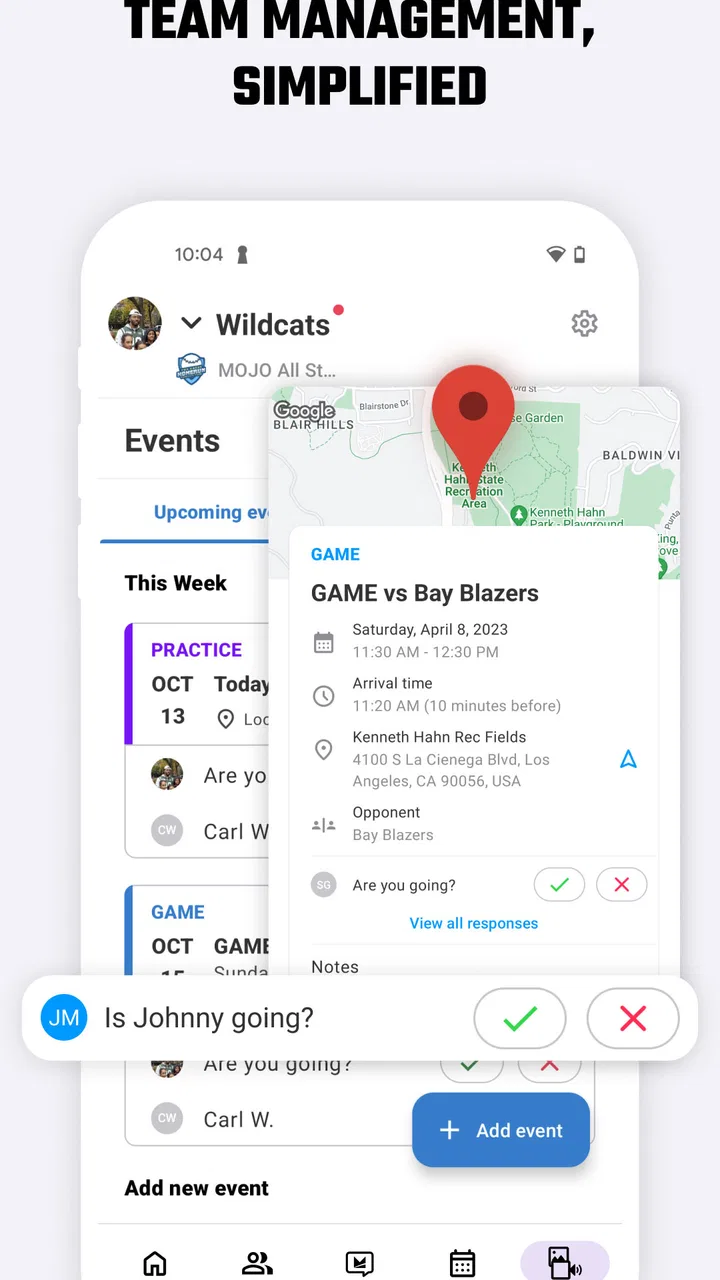
I tried MOJO Sports with the mindset of a first-time coach who wants to get a team organized without turning every practice into an administrative project. It is a free sports app from MOJO Sports, built around coaching and streaming sports rather than simply following scores or reading news. That distinction matters: its value depends much more on how you run a team than on how often you open it alone.
My first impression was that the app makes the most sense when it sits between planning, communication, and sharing what happens on the field. A parent looking only for schedules may find it more involved than necessary, while a coach who needs a practical digital home for a team can get much more from it. The store rating is a 4.1 average from around 248 ratings, and the app has passed 100K installs, so it has clearly found an audience without feeling like a massive, impersonal platform.
What to expect before you begin
The safest way to think about MOJO Sports is as a coaching companion with a media side, not as a replacement for every sports service you already use. Its store summary is “Coach & Stream Sports,” and that short phrase gives a useful clue about the two sides of the experience: helping a coach manage activity and making sports content easier to share or watch.
You May Also Like

 Blood Strike: 2.5 Anniversary
Blood Strike’s Loadouts Turn Every Drop Into a Tactical Gamble
A close look at Blood Strike’s custom loadouts: how fast access to signature weapons reshapes its battle royale rhythm, rewards preparation, and narrows the gap between fights.

 Pandora - Music & Podcasts
Pandora’s Music Is Easy to Start, but Harder to Recover
Pandora’s strength is its low-effort path from a seed to a station. Its weak spot is how much confidence it asks you to place in connection, setup, and quiet recovery.

 8 Ball Pool
 Is Built on Rivalries, Rematches, and Routine
A close look at the rivalries, rematches, shared routines, and unanswered safety questions that turn a quick pool match into a persistent mobile community.

 Samsung Music
’s Quiet Strength Is Playing What You Already Own
Its reach comes less from spectacle than from dependable access to a personal library. That simplicity is both the app’s strongest retention engine and its ceiling.

 AccuWeather: Weather Radar
AccuWeather Review: A Quick, Clear Forecast for Everyday Decisions
For everyday plans, the best forecast is the one you can understand quickly. AccuWeather makes rain timing, radar, and local conditions easy to act on, with a few trade-offs.

 Hill Climb Racing
Why Hill Climb Racing Still Turns Crashes Into One More Run
A tiny car, a bumpy hill and one more upgrade: Hill Climb Racing keeps resurfacing because its simple chaos makes every near-miss feel personal.
More From Our News Desk
View All News


I would not install it expecting a complete professional club-management suite. The app is better suited to everyday youth and recreational sports situations, where a coach needs to prepare, communicate, and keep families involved. It also makes sense for a coach who wants one place to return to instead of scattering information across group chats, paper notes, and separate video tools.
The audience rating is Everyone, which fits the family-oriented nature of team sports. The app is free to install, although optional in-app purchases range from $1.99 to $59.99 per item. I would treat that as a reason to explore the basic experience first and decide later whether any paid option genuinely helps your team. A free download does not automatically mean every useful path will remain free, so checking the purchase screen before committing a whole group is sensible.
On Android, the listed minimum is version 8.0, so owners of older phones should check compatibility before planning around it. The current release is 1.67.0+production-release. I prefer seeing an app maintained through a clearly identified production release, but version numbers alone do not tell me whether every device will behave identically. For a coach, the practical lesson is simple: install it before the first important practice, not five minutes before players arrive.
Compared with a basic messaging group, MOJO Sports can offer a more organized sports-specific workflow. A chat is fast for “practice moved to six,” but old messages disappear into conversation, and videos or instructions become difficult to find. Compared with a general video-sharing service, a sports app can keep the activity connected to the team context. The trade-off is that another app requires participation: if families do not open it, the organizational advantage shrinks quickly.
Who will get the most from it
I see the strongest fit for volunteer coaches, youth-team organizers, and families who want a clearer connection to what the team is doing. It is especially useful when a coach is trying to make practices feel more deliberate rather than improvising every session. A coach can also use the app as a consistent point of reference for people who miss a practice or want to understand what the team has been working on.
Players and parents may appreciate it for a different reason. They do not necessarily need to manage the team, but they can benefit when coaching material and sports moments are easier to revisit. That is more useful than a one-time announcement because it supports continuity: someone can return to the same team space instead of asking the coach to resend information.
I would skip it if you only need a calendar, a scoreboard, or a quick one-way announcement. A simple calendar app may be faster for dates, and a messaging service may be enough for a very small group that rarely changes. I would also hesitate if your team refuses to adopt new tools. The best sports workflow is not the one with the most functions; it is the one everyone actually uses.
Setting up the first useful workflow
After installing, I recommend resisting the temptation to explore every area immediately. Start with the role you actually have. A coach should approach the app differently from a parent, and mixing those perspectives can make the opening experience feel more complicated than it needs to be. Decide whether your first goal is organizing coaching activity or following what a team is sharing.
Before inviting everyone, prepare the smallest useful piece of information. That might be the team identity, the next practice, or the first piece of coaching material you want people to see. This is one of the most important practical tips I took away: make the first shared action useful on its own. If the first invitation only asks people to create accounts without showing a clear benefit, adoption becomes harder.
I would also set aside a few minutes to check how the app presents content on your own phone before asking parents to join. Small details matter in a team setting. You want to know where you return after opening the app, how clearly the current activity is displayed, and whether the information you care about is easy to locate. A coach who can answer “where do I find that?” saves the group a surprising amount of back-and-forth.
For a first setup, keep the structure narrow. Do not try to recreate an entire season in one sitting. Begin with the immediate team need, then add more only after you have seen how people respond. This approach reduces clutter and gives you a practical test of whether MOJO Sports fits your group. It also prevents a common mistake: building a detailed system that looks impressive to the organizer but feels overwhelming to families.
Another useful habit is to separate preparation from sharing. I would first decide what the team needs to know, then publish or send it once it is coherent. Posting half-finished instructions can create confusion, particularly when parents are checking the app between work, school, and transport. The app cannot solve unclear coaching communication by itself; it works best when the person using it has already made the message straightforward.
Getting to the first meaningful success
The first successful action should be something the team can immediately understand and use. For a coach, that means creating or sharing a focused piece of sports activity rather than merely opening menus. For a player or parent, success means reaching the relevant team material without needing a personal explanation from the coach.
I suggest choosing one narrow practice objective. Instead of trying to represent every drill, every position, and every future event, start with the skill or activity that matters next. This makes the app feel purposeful. It also gives you a clear way to judge the result: did the players or families know what to do next, and could they find the information again?
The streaming side deserves a similar approach. If you are sharing sports content, begin with the moment or activity your audience is most likely to care about. Do not assume that more content is automatically better. A short, well-timed update can have more value than a crowded feed because people can understand it quickly and return to it when needed.
One non-obvious advantage of this approach is that it turns the app into a feedback loop. You can see whether your team responds more readily to coaching material, shared sports moments, or practical updates. That observation helps you shape future use instead of treating the app as a fixed template. In my view, this is where a sports-specific tool can beat a generic group chat: not because it removes all work, but because it gives the work a clearer home.
For families, I would explain the first action in plain language. Tell them what they should open, what they should look for, and why it matters. Avoid presenting MOJO Sports as another obligation. Present it as the place where the next useful team item will appear. That small change in wording can make the difference between people ignoring an invitation and actually trying the app.
Where new users may hesitate
The biggest possible friction is not necessarily a technical error; it is understanding the app’s role. Because it combines coaching and streaming ideas, a first-time user may wonder whether it is primarily for team administration, sports viewing, or both. I found it easier once I chose one immediate purpose and ignored the rest until that purpose was working.
Another point of confusion is responsibility. A coach may assume families will automatically know what to do, while families may assume the coach has already posted everything they need. MOJO Sports can organize the exchange, but it cannot replace a clear routine. Tell people when to check it and what kind of material belongs there. Without that routine, even a well-designed team space can become another neglected app.
There is also a difference between storing information and making it actionable. A coach can place material in an app and still leave players unsure how to apply it. My advice is to connect every shared item to a simple instruction: watch this before practice, use this as a reminder, or return here after the session. That is a coaching choice rather than a button inside the app, but it makes the software much more effective.
Families should also understand that the free installation is only the starting point. Since in-app purchases are available, I would not ask parents to buy anything as part of the initial rollout. First establish whether the free experience solves a real problem. If a paid item later appears useful, discuss it openly with the group rather than allowing cost to become an unpleasant surprise.
Streaming can introduce a different kind of expectation. Some users may assume every sports event will be available in the same way or that sharing content is effortless. I would approach that feature as an option within the broader coaching experience, not as a promise that it replaces every dedicated sports broadcast or video platform. If your main goal is watching a large range of live competitions, a specialist streaming service may be a better fit.
Finally, remember that a team app is only as strong as its weakest habit. If the coach posts inconsistently, or if families never check, the app can feel empty even when it has useful capabilities. I recommend choosing one dependable rhythm and keeping it manageable. A smaller amount of timely information is better than a flood of irregular updates.
Practical ways to make it work better
- Start with one audience. Decide whether your first message is for coaches, players, or parents, then write it for that group instead of trying to satisfy everyone at once.
- Use a single source of truth. Once the team agrees to check MOJO Sports for a particular kind of update, avoid duplicating changing details across several chats.
- Keep coaching material connected to action. Pair a drill or sports item with a short explanation of when the team should use it.
- Test the family experience. Ask one trusted parent to open the app as a normal participant and describe what feels obvious or unclear.
- Review purchases as a group decision. Explore the free workflow first, then consider whether an optional item justifies its cost for your specific team.
These steps may sound simple, but they address the real trade-off. MOJO Sports can reduce scattered communication, yet it asks the coach to be more intentional. If you want an app that makes every decision automatically, this will probably disappoint you. If you want a structured place to support a coaching routine, that extra intention is worthwhile.
What I would do after the first week
Once the first team action works, I would resist adding features just to make the app look busy. Instead, look for the point where the current workflow breaks down. Are people missing practice information? Are players forgetting what they worked on? Are families interested in shared sports content but not coaching material? The answer should determine your next step.
For a coach, the next useful move is usually consistency. Use the same general path for the next few updates so people learn where to look. Then refine the content based on real questions from the team. If several parents ask for the same clarification, that is a sign that the information needs to be presented more clearly, not necessarily that the app needs more features.
For a parent, I would first decide whether the app helps me stay connected without adding noise. If it does, keep notifications and checking habits focused on the team’s actual routine. If it does not, there is no reason to force MOJO Sports into your daily life simply because it is available. A good sports app should make participation easier, not create another source of low-value interruptions.
The comparison with ordinary alternatives becomes clearer over time. A chat remains better for urgent, informal conversation. A calendar remains better for a bare list of dates. A specialist streaming service remains better when broad viewing is the main goal. MOJO Sports is more compelling in the middle: when coaching, team context, and shared sports content need to live closer together.
I also think the app is more valuable for developing routines than for solving one isolated problem. If your team only needs a single announcement, installing it may be unnecessary. If the season involves repeated coaching communication and a desire to keep families connected to the activity, the investment of learning it can pay off. That is the central trade-off I would explain to a friend.
My recommendation for different users
I would recommend MOJO Sports to a coach who is tired of managing a team through disconnected tools and is willing to establish a clear habit around one sports app. I would also recommend trying it to families who want more context than a simple schedule can provide. The fact that it is free to install makes a careful trial reasonable, provided everyone understands that optional purchases exist.
I would be more cautious for a highly competitive organization that needs specialized professional administration, detailed league operations, or a tightly controlled broadcast workflow. In that situation, a dedicated platform built around the organization’s exact requirements may be stronger. I would also steer away from it for someone who wants only sports scores or general live television; those are different jobs.
After using it as a practical team tool, my view is positive but measured. MOJO Sports is not valuable because it promises to do everything. It is valuable when a coach gives it a defined role and helps the team understand that role. The first meaningful success is not downloading the app; it is getting one useful coaching or sports-sharing action in front of the right people and making sure they can return to it.
For a first-time user, that is the path I would follow: install it early, choose one immediate team goal, prepare a small and clear first item, test the experience from a participant’s perspective, and only then expand. With that approach, MOJO Sports feels approachable rather than overwhelming. Its limitations remain real, especially for users seeking a minimalist calendar or a full broadcast service, but for coaches and families who want a more connected sports routine, it is worth trying.
FAQs for MOJO Sports
01What is MOJO Sports, and what can I use it for?
MOJO Sports is a sports-focused app designed to help users follow, organize, and engage with youth and recreational sports. Depending on the sport and location, it may provide team information, schedules, scores, rosters, standings, updates, and communication tools. Before downloading, check whether the leagues, clubs, or sports you follow are supported in your region, since available features can vary by organization.
02Is MOJO Sports free to download and use?
The app may be available to download at no cost, but some features, programs, subscriptions, or sports services can require payment. Costs may depend on the league, club, coach, or specific MOJO offering you choose. Review the pricing information shown in the app and confirm whether any trial automatically changes into a paid subscription. In-app purchase terms may also differ between Android and iOS.
03Do I need an account to use MOJO Sports?
Many of the app’s useful features require an account, particularly if you want to manage a team, join a club, view personalized schedules, communicate with other members, or access player information. Registration may involve an email address, password, and personal or team details. Parents and guardians should review the information requested and use appropriate privacy settings when creating accounts for children.
04Can parents, coaches, and players use the same MOJO Sports account?
MOJO Sports is generally intended to support different roles within a sports community, including parents, coaches, players, and administrators. However, the permissions and tools available may differ depending on the role assigned to an account or team. A coach might manage practices and rosters, while a parent may mainly follow schedules and updates. Confirm the correct role during setup to avoid missing important features.
05Is MOJO Sports safe for children and does it protect personal information?
Because MOJO Sports can involve youth teams and family information, users should review its privacy policy, permissions, and communication settings before using the app. Avoid sharing unnecessary personal details, and make sure children communicate only through approved team channels and under appropriate adult supervision. Privacy protections and account requirements can change, so parents should regularly check settings and official policy updates.
Pros
- Live scores and game updates help you follow matches in real time.
- Covers multiple sports
- leagues
- and competitions in one app.
- Match statistics provide useful context beyond the final score.
- Personalized alerts keep you informed about selected teams and games.
- Clean navigation makes it easy to find fixtures and results quickly.
Cons
- Some advanced features or content may require a paid subscription.
- Notification frequency can feel excessive until alerts are customized.
- Coverage and statistics may vary between sports and competitions.
- Live updates depend on a stable internet connection to remain accurate.
- Advertising can interrupt the experience for users on the free plan.

MOJO Sports
Gallery